The Ultimate Home Office Walking Pad Setup 2026
Transform your workspace into an active office. Our comprehensive guide covers everything you need to set up the perfect home office walking pad system with ergonomic tips, product recommendations, and maintenance advice.
Affiliate Disclosure: TheBestWalkingPads.com is a participant in the Amazon Services LLC Associates Program. We earn a small commission on qualifying purchases at no extra cost to you.
Why Home Office Walking Pads?
More Productivity
Studies show walking improves focus and creative thinking, leading to better work output and engagement.
Daily Burn Potential
Walking just 2-3 hours while working can burn 400-700 extra calories daily without gym time.
Space-Efficient
Modern walking pads fold or fit under standing desks, perfect for apartments and home offices.
Top Walking Pads for Home Office
Our recommended walking pads optimized for quiet operation and office environments:

KingSmith WalkingPad P1
by KingSmith
Best for: Budget-conscious tall users
Product prices and availability are accurate as of the date/time indicated and are subject to change. Any price displayed on this site at the time of purchase will govern the sale of the product. As an Amazon Associate, we earn from qualifying purchases.
Essential Setup Components
🚶 The Walking Pad
The centerpiece of your home office setup. Look for models with quiet motors (under 50dB), foldable designs for space-saving, and app connectivity for tracking.
- ✓Noise Level: Choose 50dB or quieter for video calls and concentration
- ✓Belt Size: Aim for 16-17" wide and 40-47" long for comfortable strides
- ✓Foldable Design: Saves space and allows easy storage when not in use
- ✓Weight Capacity: Ensure it supports your body weight with a safety margin
🖥️ Standing or Adjustable Desk
Pair your walking pad with a standing or adjustable desk for ergonomic flexibility. This allows you to switch between walking, standing, and sitting throughout the day.
- ✓Height Adjustment: 28-48 inches is ideal for most users
- ✓Desk Depth: 24-30 inches allows walking pad to fit underneath
- ✓Surface Area: Minimum 48x24 inches to accommodate monitor and keyboard
- ✓Stability: Weighted base prevents wobbling while you walk
Standing Desks That Fit a Walking Pad

ErGear Height Adjustable Electric Standing Desk 48x24
by ErGear
Reaches 48 inches to clear a walking pad, with 4 memory presets for quick height changes.

HUANUO Electric Standing Desk One-Piece 48x24
by HUANUO
One-piece desktop is sturdier underfoot while you walk, with 4 height memory settings.

SHW 48-Inch Electric Standing Desk with Drawer
by SHW
Adds a storage drawer and built-in cable tray to keep your walking station tidy.
As an Amazon Associate we earn from qualifying purchases. Live prices are fetched from Amazon and shown with the time they were retrieved.
🛡️ Anti-Fatigue Mat
A quality anti-fatigue mat reduces strain on your feet and joints, providing additional cushioning and stability under your walking pad.
- ✓Thickness: 3-5mm is ideal; thicker mats can affect gait
- ✓Non-Slip Base: Prevents mat from sliding during use
- ✓Size: Should be slightly larger than your walking pad (60x36" minimum)
- ✓Durability: Look for closed-cell foam or rubber construction
Mats for Under Your Walking Pad

Comeyly Treadmill Mat 79x39.4 High-Density Non-Slip
by Comeyly
Large 79-inch high-density mat protects floors and dampens vibration under your pad.

Rolitwils Treadmill Mat Pads 4-Pack Anti-Vibration
by Rolitwils
Four non-slip pads cut vibration and noise for quieter walking on hard floors.
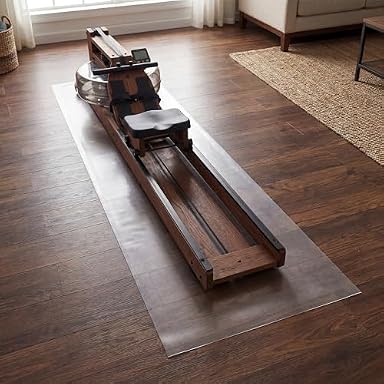
MABOZOO Transparent Walking Pad Floor Mat 100x35
by MABOZOO
Transparent 100-inch mat protects hardwood without hiding your floor finish.
As an Amazon Associate we earn from qualifying purchases. Live prices are fetched from Amazon and shown with the time they were retrieved.
🔌 Cable Management
Keep cables organized and out of the way for safety and aesthetics. Proper cable management prevents tripping hazards and protects equipment.
- ✓Cable Clips and Ties: Route cables along desk legs and keep them secure
- ✓Power Strip: Multi-outlet strips keep everything plugged in conveniently
- ✓Wireless Peripherals: Consider wireless mouse and keyboard to reduce cable clutter
- ✓Ceiling Mounts: For monitor arms and cables above desk level
Cable Management Kits

NOROCME 192-Piece Cable Management Kit
by NOROCME
Sleeves, clips and ties keep cords off the floor and away from a moving belt.

ZIIYAN 163-Piece Cable Management Kit
by ZIIYAN
Budget all-in-one kit to bundle and route every cable on your walking desk.
As an Amazon Associate we earn from qualifying purchases. Live prices are fetched from Amazon and shown with the time they were retrieved.
Ergonomic Setup Tips
Monitor Positioning
- →Position monitor at eye level while standing and walking
- →20-30 inches from your face prevents neck strain
- →Use a monitor arm for easy adjustments
- →Tilt slightly upward (10-20 degrees below eye level)
Monitor Arms for Eye-Level Walking

MOUNTUP Single Monitor Desk Mount Full Motion to 32in
by MOUNTUP
Full-motion arm raises your screen to eye level so you walk without neck strain.

ErGear Single Monitor Arm 13-34in Tool-Free VESA
by ErGear
Tool-free VESA mount fits screens up to 34 inches and frees up desk space.
As an Amazon Associate we earn from qualifying purchases. Live prices are fetched from Amazon and shown with the time they were retrieved.
Keyboard & Mouse Setup
- →Elbows at 90-degree angle, close to your body
- →Use an ergonomic keyboard tray if needed
- →Wireless keyboard and mouse reduce cable clutter
- →Place mouse close to keyboard for easy reach
Walking Posture
- →Maintain neutral spine alignment
- →Shoulders relaxed, not hunched
- →Walk at 1.5-2.5 mph for comfortable working pace
- →Take 5-minute breaks every hour for stretching
Space & Flooring
- →Ensure 6+ feet of clear floor space
- →Use hard flooring (wood, tile) instead of carpet
- →Place anti-fatigue mat for comfort and stability
- →Keep the area well-lit and temperature-controlled
Ready to Set Up Your Home Office?
Follow these steps to create your perfect home office walking pad setup:
- 1.Choose a quiet walking pad rated for office use (under 50dB)
- 2.Set up an adjustable standing desk that fits your space
- 3.Place an anti-fatigue mat under and around the walking pad
- 4.Organize cables and use wireless peripherals
- 5.Start slowly (30 minutes daily) and gradually increase duration
Frequently Asked Questions
What size walking pad fits under a standard desk?
Most modern desks are 72 inches wide and 30 inches deep. Standard walking pads typically measure 50-70 inches long and 25-30 inches wide. Look for models with widths between 15-17 inches and lengths of 39-47 inches. These dimensions fit comfortably under most standing or adjustable desks without interfering with monitors or keyboards.
How much space do I need for a home office walking pad?
You need at least 6 feet of clear floor space (length) and 3 feet of width. Most walking pads measure around 50-70 inches long and 25-30 inches wide, so they fit well in standard home office spaces. If space is tight, look for foldable models that can be stored vertically or under furniture when not in use.
Is it quiet enough for video calls?
Yes, if you choose the right model. Look for walking pads rated at 50dB or lower for video call compatibility. The KingSmith A1 Pro (40dB) and Citysports Under-Desk (45dB) are specifically designed for office environments and won't disrupt calls. Avoid models without noise specifications or those rated above 60dB.
Can I use a regular treadmill instead of a walking pad?
While possible, walking pads are better for home offices because they're compact, quieter, designed for walking speeds, and easier to store. Traditional treadmills are bulkier, louder, more expensive, and optimized for running. Walking pads are purpose-built for the home office environment.
What anti-fatigue mat should I use with my walking pad?
Look for thin, durable anti-fatigue mats designed for treadmills (3-5mm thick). Thicker mats may affect your gait and stability. The mat should be slightly larger than your walking pad's footprint. Brands like CumulusMax, Imprint, and Lifelong are popular. Some users prefer cushioned floor underneath the entire walking station for added comfort.
How many calories do you burn while using a walking pad?
Calorie burn depends on your body weight, speed, and duration. At 3 mph, a 150-lb person burns approximately 200-250 calories per hour. At 4 mph, that increases to 300-350 calories per hour. Most users find that walking 2-3 hours per day while working can burn an additional 400-700 calories.
Should the walking pad be on carpet or hard floors?
Hard floors are ideal. Carpet can reduce stability and affect the treadmill's performance. If you have carpet, place a non-slip mat under the walking pad to improve stability and protect your flooring. Hard floors like tile, laminate, or wood work best for safety and performance.
Can I use a walking pad while working at a computer?
Absolutely! Walking pads are designed for this purpose. A slow 1.5-2.5 mph pace allows you to walk while typing, attending calls, or doing light computer work. Adjust your monitor to eye level, and use a wireless keyboard and mouse for optimal comfort and safety.
Walking Pad Maintenance & Care Tips
Daily Care
- • Wipe down the belt and frame after each use
- • Remove dust and debris from the motor area
- • Check for any unusual noises or vibrations
- • Ensure the mat is clean and free of moisture
- • Keep the area around the walking pad clear
Monthly & Yearly
- • Check belt tension and adjust if needed
- • Lubricate the belt per manufacturer instructions
- • Inspect cables for wear or damage
- • Test all electronic features and buttons
- • Review warranty information and support options
TheBestWalkingPads.com is a participant in the Amazon Services LLC Associates Program. We earn a small commission on qualifying purchases at no extra cost to you.